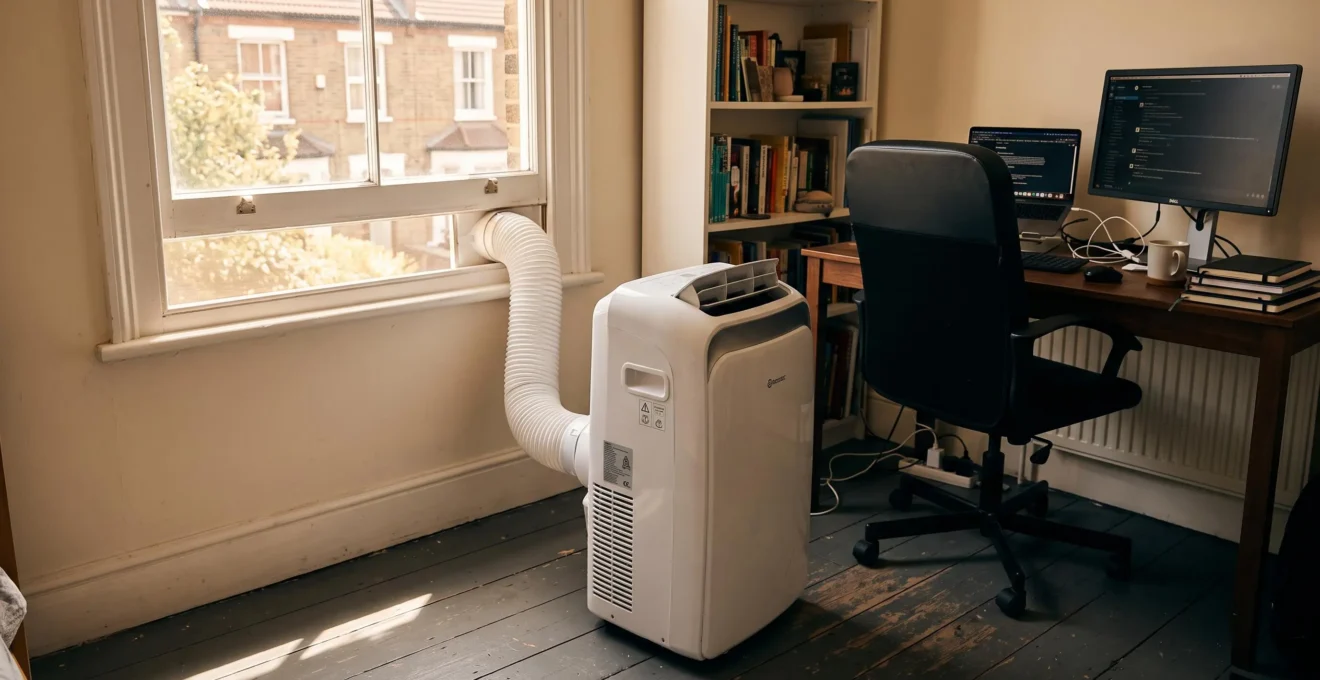
The temperature in your home office has reached 32°C, your deadline looms, and the weather forecast promises another week of sweltering heat. A portable air conditioner seems like the obvious solution—except for one nagging worry: will plugging it in trip your circuit breaker, plunge your workspace into darkness, and potentially damage your equipment?
This concern is particularly acute if you live in a Victorian or Edwardian property with partially renovated electrics, where the wiring might date from several different decades. The good news is that understanding three straightforward variables—your AC’s power consumption, your circuit’s capacity, and what else is already drawing power—allows you to evaluate compatibility yourself, without necessarily calling an electrician.
Most modern UK residential installations can comfortably support a portable air conditioner sized appropriately for a home office, provided you verify these three elements first. The entire check takes roughly five to ten minutes and requires no specialist equipment.
- The short answer: usually yes, with three essential checks
- How much power does a portable AC actually draw?
- What is the capacity of a standard home office circuit?
- The hidden culprits: what else is running on your circuit?
- How can you prevent circuit overload before it happens?
- When should you call an electrician?
- Practical next steps for a cool, safe home office
The short answer: usually yes, with three essential checks
Your quick answer: The majority of modern UK residential installations can safely support a portable air conditioner suited to a home office, provided the unit draws no more than your circuit’s available capacity after accounting for other devices already in use.
Rather than offering an evasive “it depends,” the practical reality is this: a typical home office portable AC consuming between 700 and 1,200 watts can run safely on a standard British ring main circuit rated at 32 amperes—which is the configuration found in most homes built or rewired in recent decades.
The qualification lies not in whether it’s theoretically possible, but in verifying three specific conditions before you switch the unit on. Think of these as a framework for autonomous evaluation:
- The appliance’s power draw: measured in watts, typically between 700W and 1,200W for units suitable for a 12–15m² office space
- Your circuit’s capacity: determined by the rating of the circuit breaker (MCB) in your consumer unit, commonly 32A for socket ring mains
- The cumulative load: everything else already plugged into that same circuit—computers, monitors, printers, chargers, lighting
Each of these variables is observable or calculable without specialist knowledge. The first appears on the AC unit’s specification label, the second is marked on your consumer unit, and the third requires a quick mental inventory of your workspace equipment.
One important nuance applies specifically to properties like Victorian or Edwardian terraces with partial renovations. If your home’s electrical installation mixes modern circuits with older wiring sections—common when only some rooms were updated during purchase—the stated capacity of a circuit breaker might not reflect the true load-bearing ability of the cables behind your walls. In these mixed installations, the criteria for professional consultation become more stringent, as we’ll detail later.
How much power does a portable AC actually draw?
Product specifications for air conditioners present three different measurements—BTU, watts, and amperes—which often causes confusion when you’re trying to assess compatibility with your home’s electrical system. Understanding how these relate to one another transforms an intimidating technical specification into actionable information.
BTU (British Thermal Unit) measures cooling capacity: how much heat the appliance can remove from your space per hour. For a typical home office of 12–15 square metres, units rated between 7,000 and 10,000 BTU provide adequate cooling without excessive energy waste. This is the figure you’ll see most prominently in marketing materials.
The electrical consumption that matters for circuit compatibility, however, is measured in watts. A portable AC doesn’t convert BTU directly into watts at a fixed ratio—efficiency varies by model—but as a general pattern, higher cooling capacity requires more electrical power. A 7,000 BTU unit might draw around 700–800W, whilst a 9,000 BTU model typically consumes 900–1,100W during operation.
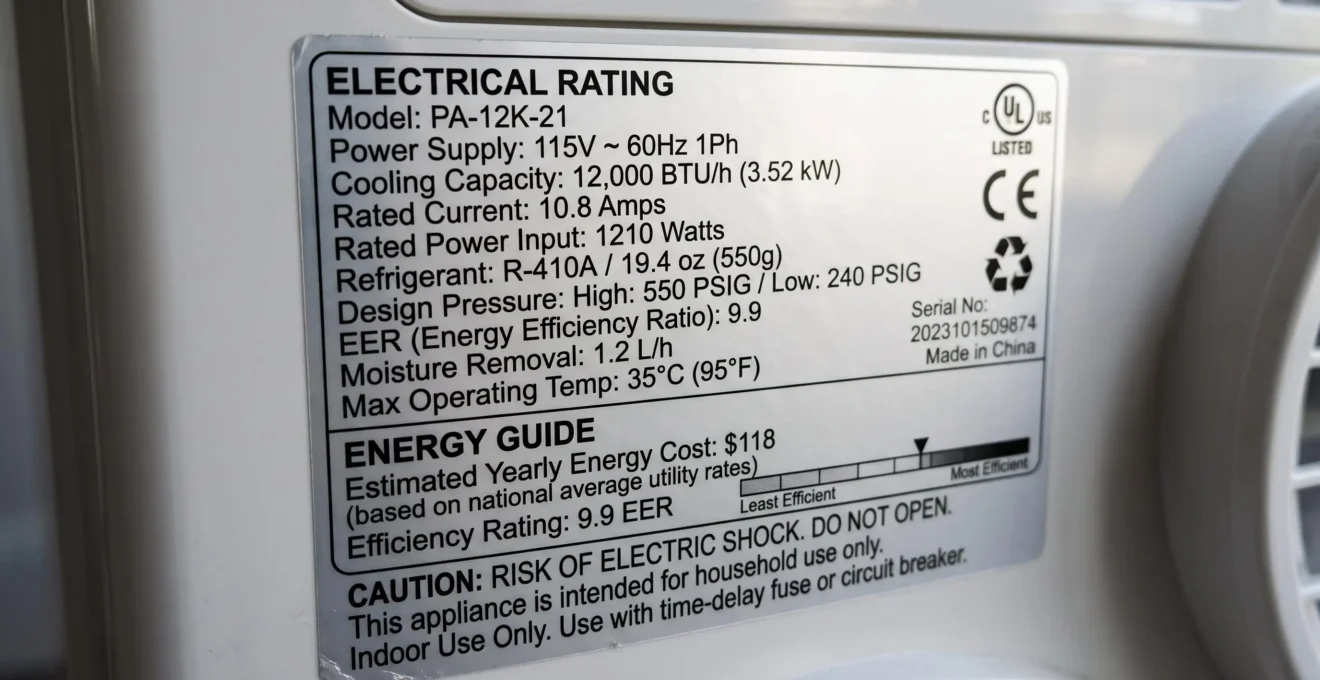
To relate this to your circuit’s capacity, you need to convert watts into amperes, since UK circuit breakers are rated in amps. The formula for British domestic supply (230 volts) is straightforward:
Amperes = Watts ÷ 230
A 1,000W portable AC therefore draws approximately 4.3 amperes during continuous operation (1,000 ÷ 230 = 4.35A). This is roughly equivalent to the power consumption of an electric kettle whilst heating water—except the kettle runs for two minutes, whereas the AC might operate for several hours.
| Cooling capacity | Typical power consumption | Amperage draw (230V) |
|---|---|---|
| 7,000 BTU | 700–800W | 3.0–3.5A |
| 9,000 BTU | 900–1,100W | 3.9–4.8A |
| 10,000 BTU | 1,000–1,200W | 4.3–5.2A |
One additional factor affects circuit compatibility: the difference between continuous running consumption and the temporary surge when the compressor starts. Older AC models without inverter technology can draw significantly more current during the first few seconds of operation—sometimes 50–100% above the steady-state consumption. This startup spike explains why some users experience circuit trips only when the unit switches on, not during sustained operation.
Modern units with inverter technology reduce this startup surge by ramping up the compressor gradually rather than demanding full power instantly. This makes them inherently safer for marginal electrical installations, though the benefit extends beyond just circuit compatibility to improved energy efficiency and reduced wear on components.
What is the capacity of a standard home office circuit?
British domestic wiring follows standards distinct from most other countries, which means generic international advice about circuit capacity often doesn’t apply here. Understanding how UK installations work allows you to determine what your specific circuit can handle.
Every socket outlet in your home is protected by a 13-amp fuse fitted inside the plug itself, conforming to the BS 1363 standard. This leads to a common misconception: that each socket can deliver a maximum of 13A, therefore your circuit’s total capacity must be 13A multiplied by the number of sockets. This is incorrect.
The actual limiting factor is the circuit breaker (MCB) in your consumer unit—the modern equivalent of the old fuse box, typically located under the stairs, in a hallway cupboard, or attached to a wall in the garage. This protective device disconnects power if the total current drawn by everything on that circuit exceeds a safe threshold.
According to UK ring main circuit standards, residential socket circuits typically use one of two configurations. A ring final circuit—commonly called a ring main—starts at the consumer unit, loops through multiple socket outlets, and returns to the same protective device, usually a 32A MCB. Lighting circuits, by contrast, typically run on 16A or 20A breakers.
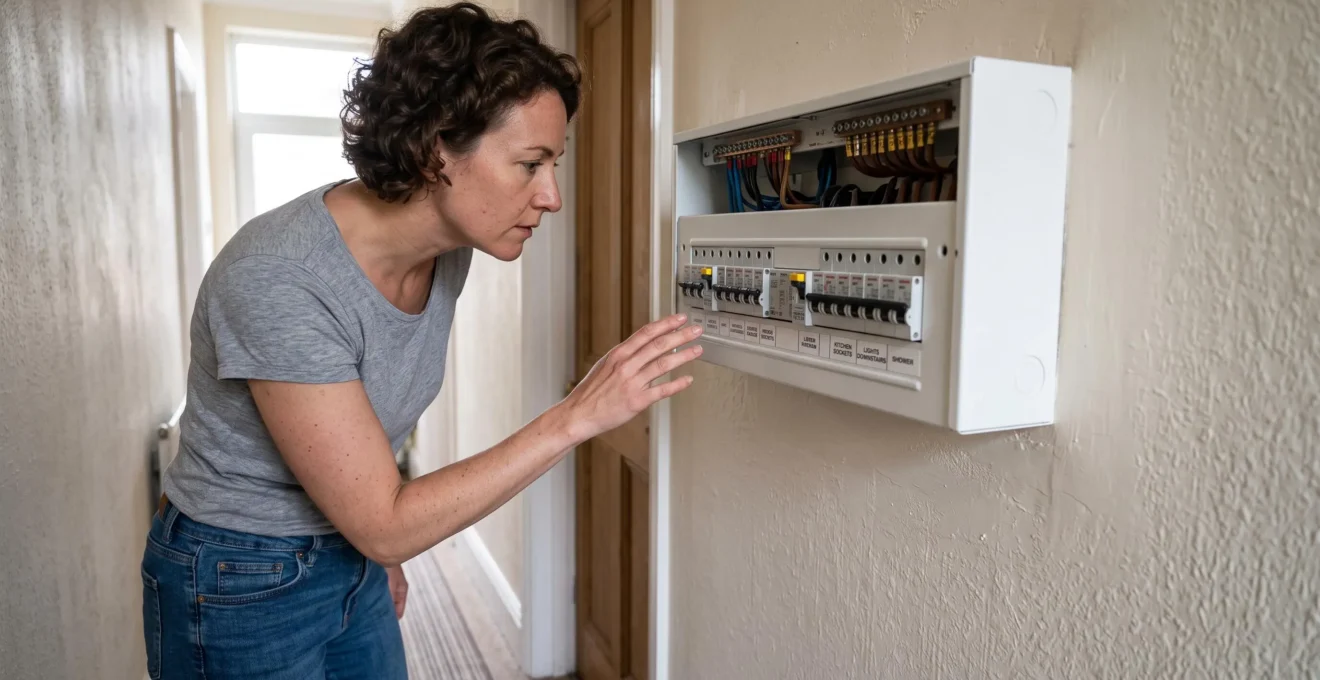
To identify your home office circuit’s capacity, locate your consumer unit and open the protective cover. Each MCB should be labeled with the circuit it protects (“upstairs sockets,” “downstairs ring,” “lighting,” etc.) and its amperage rating, stamped directly on the switch itself—commonly B16, B20, or B32, where the number indicates the maximum current in amperes.
A 32A ring main offers theoretical capacity of 7,360 watts (32A × 230V). Electrical safety guidance recommends maintaining a margin below maximum theoretical capacity, typically around 80%, which yields approximately 5,900W of safe continuous load. This provides substantial headroom for a home office with a portable AC.
Ring main vs radial: why it matters: The UK is one of the few countries using ring final circuits for power sockets. Unlike radial circuits where cable capacity limits the number of outlets, a ring main allows multiple sockets to share a 32A total capacity because current can flow through the loop from either direction. This is why several devices can safely draw power from different sockets on the same circuit, provided their combined consumption stays within the breaker rating.
Properties with partial renovations present a complication. Victorian and Edwardian houses often contain circuits where the modern consumer unit and breakers were installed during one renovation, but some of the original cable remains in the walls from earlier decades. A circuit might have a 32A MCB fitted, yet sections of the wiring behind the plaster might only support 20A safely. Without documentation from the electrician who performed the work—required under Part P Building Regulations since 2005—you cannot verify this through visual inspection alone.
The hidden culprits: what else is running on your circuit?
Knowing your circuit’s rated capacity is only half the equation. The other half is calculating what’s already consuming power when you plug in the air conditioner. Many home workers underestimate this cumulative load because individual devices seem modest, yet they accumulate quickly.
A typical home office setup comprises several continuous consumers. A desktop PC draws between 200 and 400 watts depending on specification and workload, whilst a laptop consumes considerably less—usually 50–100W. Each LCD or LED monitor adds another 30–60W. An LED desk lamp might use 10–20W per bulb, seemingly negligible until you account for multiple light fittings. A router or modem typically consumes 10–15W continuously.
Intermittent devices complicate the picture. A laser printer in standby mode might draw only 10W, but during active printing this can spike to 300–400W for short periods. Phone and laptop chargers each add 10–30W when actively charging, though they drop to near-zero once the battery is full.

To model this concretely: imagine a freelance graphic designer’s workspace in a converted bedroom. The setup includes a desktop PC (300W), two external monitors (80W combined), a laser printer in standby (50W), three LED ceiling spots (45W total), a desk lamp (15W), and a router (12W). Before adding any cooling equipment, this configuration already consumes approximately 502W continuously, or roughly 2.2A on a 230V circuit.
Adding a 9,000 BTU portable air conditioner drawing 1,000W brings the total to 1,502W, equivalent to 6.5A. On a 32A ring main circuit with an 80% safety margin (25.6A available), this leaves substantial unused capacity—over 18A, or approximately 4,100W.
| Device | Typical consumption | Amperage (230V) |
|---|---|---|
| Desktop PC | 200–400W | 0.9–1.7A |
| Laptop computer | 50–100W | 0.2–0.4A |
| LCD/LED monitor (per unit) | 30–60W | 0.1–0.3A |
| Laser printer (standby) | 10–50W | 0.04–0.2A |
| Laser printer (active) | 300–400W | 1.3–1.7A |
| LED desk lamp | 10–20W | 0.04–0.09A |
| Router/modem | 10–15W | 0.04–0.07A |
| Phone charger (active) | 10–20W | 0.04–0.09A |
Hidden consumers often escape this mental inventory. Multiple device chargers—laptop, phone, tablet, headphones—can collectively add 50–100W. If your office shares a circuit with an adjacent bedroom, a clock radio, bedside lamp, or phone charger in the other room contributes to the total. Winter introduces another variable: if you’ve previously used an electric heater in the same space, that likely consumed 1,000–2,000W, which explains why it might have tripped the circuit when combined with other appliances.
The distinction between continuous and intermittent loads matters for risk assessment. Devices that operate constantly—the PC, monitors, AC unit—define your baseline consumption. Intermittent consumers like printers create temporary spikes. A circuit won’t necessarily trip if the cumulative load briefly exceeds capacity for a few seconds, but sustained overload will trigger the protective device. When planning your setup, calculate based on realistic simultaneous maximum usage rather than the theoretical sum of every device’s peak consumption.
How can you prevent circuit overload before it happens?
Understanding capacity and consumption is the foundation; applying that knowledge to prevent problems requires practical strategy. Several actionable steps allow you to optimize your circuit’s available headroom before introducing additional load from an air conditioner.
The most effective intervention is redistributing devices across different circuits. Many appliances don’t genuinely need to occupy the same circuit as your computer and AC. If your laser printer sits on your desk purely for convenience, moving it to a socket downstairs connected to a different ring main immediately liberates 300–400W of potential load during print jobs. Phone and tablet chargers can migrate to sockets in other rooms overnight. This doesn’t reduce your total household consumption—it simply spreads the load more evenly across multiple circuits, preventing any single breaker from approaching its limit.
To identify which sockets connect to which circuits, the labeled switches in your consumer unit provide the starting point. If labels are vague or missing, a simple test using a plug-in lamp helps map your home’s electrical topology: switch off one MCB at a time and note which outlets lose power. This exercise also verifies whether the existing labels accurately reflect reality—a worthwhile check in older properties where circuits may have been extended without updating the documentation.
Once you’ve optimized load distribution, progressive testing validates the setup safely before committing to daily use. The sequence minimizes risk by introducing load incrementally:
-
Baseline verification
With all your normal office equipment running (PC, monitors, lighting), note that the circuit remains stable. This confirms your existing load doesn’t already approach capacity.
-
Isolated AC test
Temporarily switch off other devices, plug in the air conditioner alone, and start it on the lowest fan setting. Observe whether the unit powers up without tripping the breaker. Wait five minutes to allow the compressor to cycle.
-
Combined moderate load
With the AC running, switch on your PC and one monitor. If the circuit remains stable after several minutes, the core setup is viable.
-
Full operational load
Gradually reintroduce remaining devices—additional monitors, desk lamp, router. Test a printer job to verify the circuit handles intermittent spikes. If everything operates without triggering the breaker, your installation is confirmed compatible.
Technology choices during the purchasing decision further reduce electrical stress. Units with inverter technology offer tangible safety advantages beyond marketing claims. Traditional air conditioners use fixed-speed compressors that switch abruptly between full power and complete shutdown, creating those problematic startup surges. Inverter-driven compressors vary their speed continuously, ramping up gradually when cooling demand increases and slowing down rather than stopping entirely when the target temperature is reached.
Why inverter tech eases electrical stress: The startup current surge in conventional AC units can reach 150–200% of running consumption for several seconds—enough to trip a marginal circuit even though continuous operation would be sustainable. Inverter technology reduces this peak by 40–60%, spreading the power demand over a longer ramp-up period. This makes them notably more forgiving on older electrical installations whilst simultaneously improving energy efficiency by 20–30% during operation.
When you’re ready to find the right cooling appliance for your home office, prioritizing inverter-equipped models addresses both the immediate concern about circuit compatibility and the longer-term consideration of running costs.
Behavioral adaptations provide a final layer of protection. Avoid starting high-consumption devices simultaneously—don’t send a large print job at the exact moment the AC compressor kicks in, for instance. Stagger significant loads by thirty seconds to a minute. If your circuit has proven marginal during testing, running the AC on a lower fan speed during peak equipment usage (video calls requiring camera and multiple applications) reserves capacity for when you need it most.
When should you call an electrician?
Autonomous evaluation has clear boundaries. Certain situations move beyond DIY assessment into territory requiring professional inspection, and recognizing these thresholds protects both your safety and your property.
Observable warning signals provide the most reliable indicators that your electrical installation needs expert attention, regardless of what your calculations suggest should work theoretically. According to Electrical Safety First, the UK’s authoritative charity for electrical safety, these signs should never be ignored:
- Socket outlets or plugs that feel warm or hot to the touch after the AC has run for 20–30 minutes
- Scorch marks or discoloration around socket faceplates
- Buzzing, crackling, or other arcing sounds from sockets or the consumer unit
- Lights dimming or flickering noticeably when the air conditioner starts
- Circuit breakers that trip repeatedly despite calculated load remaining within rated capacity
- A burning smell or odor of heated plastic near outlets or cables
Any of these symptoms indicates that current flow exceeds what the installation can safely handle, even if the numbers on paper suggest otherwise. The appropriate response is to unplug the appliance immediately and arrange professional inspection before further use.
Electrical safety: when DIY stops: This article provides a framework for general evaluation based on standard UK residential installations. It cannot account for concealed wiring defects, undocumented modifications, or degraded components. If you observe any physical warning signals, experience unexplained circuit trips, or feel uncertain about any aspect of your installation’s condition, consult a qualified electrician registered with NICEIC or ELECSA. All work on fixed electrical installations must comply with BS 7671 Wiring Regulations and Part P Building Regulations.
Context-specific situations also warrant professional consultation regardless of symptom presence. Properties with undocumented partial renovations—precisely the scenario facing someone in a Victorian terrace where “the electrics were partly updated five years ago”—lack the installation certificates that would confirm cable specifications and safe load limits. Without this documentation, visual inspection of the consumer unit reveals only part of the picture. The MCB rating tells you when protection will activate, not whether the cables behind the walls can safely carry that current continuously.
Homes where the consumer unit has never been replaced, still containing old wire fuses rather than modern MCBs, require complete professional evaluation before adding any significant new load. Similarly, if your property has never had an Electrical Installation Condition Report (EICR)—recommended every ten years for owner-occupied homes and every five years for rental properties—scheduling this inspection provides definitive information about your system’s capability and safety.
The cost objection often prevents people from seeking professional advice when they should. A standard domestic electrical inspection from a qualified electrician typically costs between £100 and £200 depending on property size and regional variation. This investment purchases certainty and, crucially, identifies potential hazards before they cause equipment damage or create fire risk. Compared to replacing a computer destroyed by power fluctuations (£500–£1,500), repairing fire damage (thousands), or addressing the safety implications of an electrical fault, preventive assessment represents modest expenditure.
When selecting an electrician, verify registration with a Competent Person Scheme operator such as NICEIC or ELECSA. These organizations maintain standards and provide insurance-backed guarantees. Any work modifying fixed installations must result in certification confirming compliance with current regulations—a legal requirement under Part P, and essential documentation for future property sales.
Practical next steps for a cool, safe home office
Translating understanding into action requires a clear sequence. Rather than tackling everything simultaneously, a methodical approach ensures each element receives proper attention and the final setup operates safely.
-
Identify your circuit capacity
Locate your consumer unit, open the cover, and identify which MCB protects the circuit serving your home office. Note the amperage rating (typically 16A, 20A, or 32A) and verify the circuit label matches reality by testing with a lamp or phone charger.
-
Calculate existing load
List every device in your workspace that shares the circuit, note its wattage (from labels or specifications), and sum the continuous consumers. Convert the total to amperes by dividing by 230. This is your baseline consumption before adding cooling.
-
Select appropriately sized AC
Choose a unit rated for your office dimensions (7,000–9,000 BTU for 12–15m²) with power consumption that leaves comfortable margin on your circuit. Prioritize inverter technology and Energy Label rating A or A+ minimum to reduce both electrical stress and running costs. For energy-conscious operation, consider reviewing the energy cost of air conditioning before making your final decision.
-
Redistribute load if necessary
If your calculation shows minimal headroom, move devices that don’t require proximity to your workspace—printers, chargers, secondary equipment—to sockets on different circuits. This step costs nothing and can liberate several amperes of capacity.
-
Test progressively
Follow the four-stage testing sequence detailed earlier: AC alone, AC plus core equipment, AC plus full load, AC plus intermittent devices. Monitor for warning signals during initial hours of operation, particularly warm sockets or dimming lights.
To complete the scenario introduced at the article’s opening: a freelance graphic designer in a partially renovated Victorian terrace verifies that her upstairs ring main runs on a 32A MCB. Her existing office equipment consumes approximately 500W (2.2A). She selects a 9,000 BTU inverter portable AC drawing 1,000W (4.3A), bringing total continuous load to 1,500W or 6.5A—well within the circuit’s safe capacity of approximately 25A. She redistributes her laser printer to a ground-floor socket on a separate circuit. Progressive testing confirms stable operation. She now works comfortably through summer heatwaves without circuit trips, equipment damage, or the productivity loss caused by a 32°C office.
- Verify your circuit’s MCB rating and calculate available capacity after existing load
- Choose an AC unit with appropriate BTU rating (7,000–10,000 for home offices) and inverter technology
- Identify observable warning signals that would require professional consultation
Efficiency considerations extend beyond initial compatibility. Air conditioners with higher energy ratings cost more upfront but consume 20–40% less electricity during operation, reducing both your environmental impact and quarterly bills. Oversized units cycle on and off more frequently, creating repeated startup loads and wasting energy; undersized units run continuously without achieving comfortable temperatures. Matching capacity to room size optimizes both performance and electrical behavior.
For complementary approaches to managing home office comfort and energy use throughout the year, exploring practical energy saving strategies provides additional context for balancing thermal comfort with responsible consumption.
Authoritative resources for further information include Electrical Safety First’s consumer guidance on socket safety and circuit capacity, the Energy Saving Trust’s advice on efficient cooling equipment selection, and Which?’s independent portable air conditioner testing and comparisons. These organizations provide UK-specific information that accounts for our distinctive electrical standards and regulatory framework.
The framework presented here—three checks, observable criteria, clear professional consultation thresholds—transforms an anxiety-inducing technical question into a manageable evaluation process. Most modern British homes can safely accommodate a sensibly sized portable air conditioner in a home office. The difference between uncertainty and confidence lies not in complex electrical knowledge, but in methodically verifying three straightforward variables and recognizing when professional input becomes necessary.